Budgeting tool · Self-initiated
Spoonwise
Context
Solo Designer & Builder · 2026
Live at: getspoonwise.app — the app itself is at /app
Services: Product design · Content design · Accessibility & sensory design · Front-end development · Payments & auth
Ships as: An installable, offline-first PWA · Free calculator, $15 one-time unlock for everything else · No subscriptions
Stack: Next.js App Router · React · TypeScript · Tailwind · Stripe · Supabase · Resend
Typefaces: Manrope, with Mogan — the wordmark's face — reserved for the daily number
Brand guide: The Spoonwise brand guide documents the voice, palette, and spoon glyph
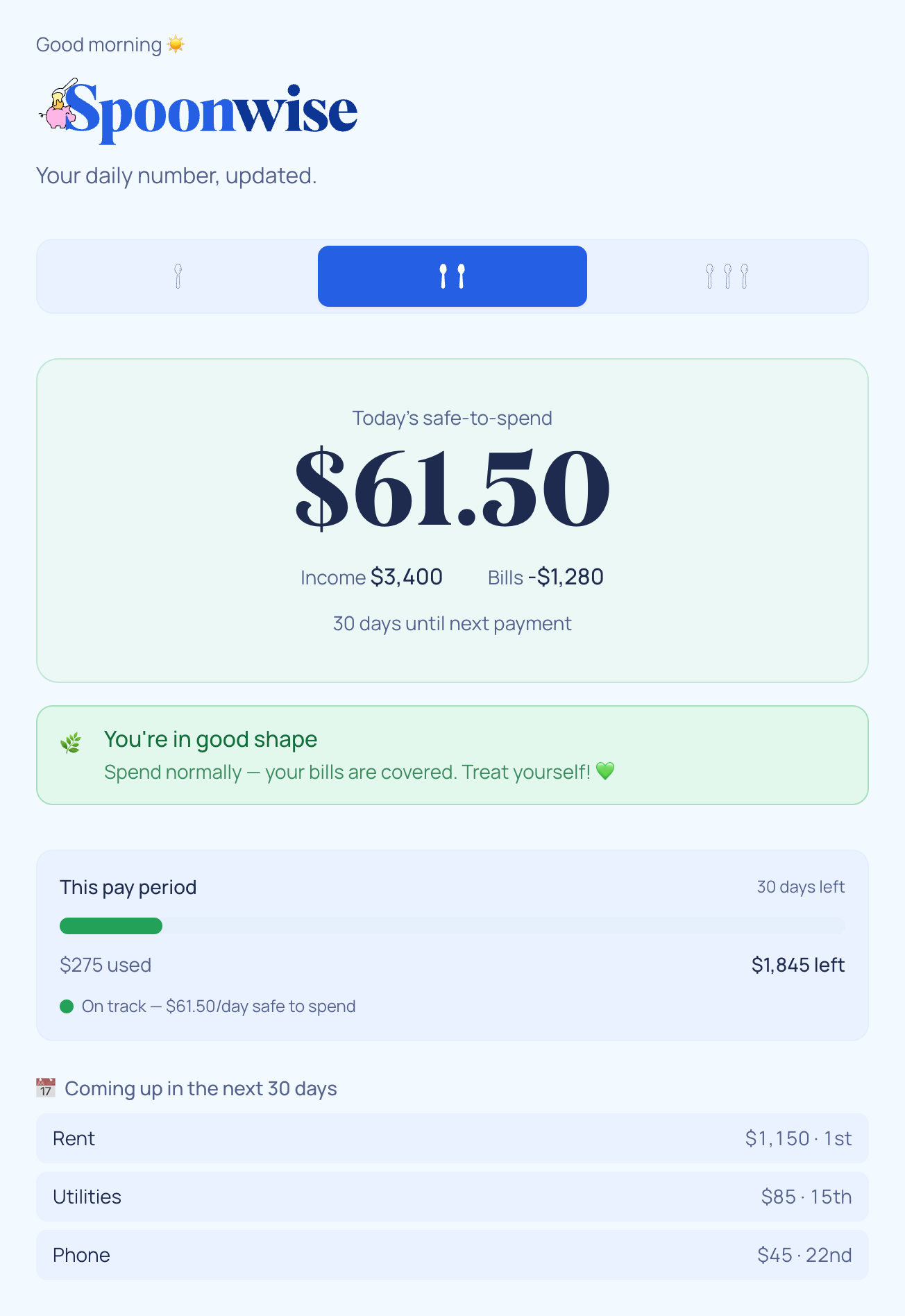
- Designed and built a daily budgeting app for neurodivergent brains: instead of categories, charts, and homework, it gives you one honest number — what's safe to spend today — recalculated from your income, bills, and savings goals
- Wrote every word of the interface to be shame-free: the status light says "Easy does it this week," never "overspent," and coming back after days away gets you a welcome, not a broken streak
- Built the whole thing solo, from the spoon-mode interaction model and sensory settings down to the Stripe checkout, magic-link auth, and a privacy architecture where budget data never leaves the device
My contributions
Content design
Every state in the app — the three status lights, the empty states, the errors, the welcome-back flow — is written to inform without judging. "Essentials only for now. Be gentle with yourself — payday is coming" carries the same information as a red warning, without the flinch.
The calculator
A pure function that prorates income, bills, and savings goals to a daily rate, holds back a 10% buffer, and does all of its math in cents. It's covered by a test suite that grew out of real bugs real use surfaced — including one that made evening paydays invisible until morning.
Sensory & access design
Spoon modes let you choose how much interface you can handle today — one spoon is just the number. A sensory settings panel covers color themes, motion, font size and weight, line spacing, and information density, because "accessible" is personal.
Payments, auth & privacy
A $15 one-time Stripe unlock, magic-link login with no passwords, and a deliberate split: budget data lives only in the browser, while the server knows nothing but the email that paid. The architecture is the privacy policy.
Summary of work
Budgeting apps assume a user who will categorize transactions, review charts, and show up every day. For a lot of neurodivergent people — my coaching clients among them — that's exactly the kind of sustained executive function that isn't reliably available. Miss a few days and the app greets you with a backlog and a broken streak. The tool designed to reduce money anxiety becomes another source of it.
Spoonwise is my answer: a daily budgeting app that asks almost nothing of you. You tell it your income and bills once, and from then on it shows you one honest number — what's safe to spend today — with a traffic light that tells you how things stand without ever scolding you. The name comes from spoon theory, Christine Miserandino's metaphor for limited daily energy, and the whole interface is organized around it: you pick how many spoons you have today, and the app shows that much of itself.
I designed and built it alone — product, copy, interface, calculator, payments, auth, tests — and it's live at getspoonwise.app. The core calculator is free, no account needed. Everything else is a single $15 unlock, because subscriptions are one more thing to track and feel bad about.
Process
One honest number
The central design decision is that Spoonwise outputs a daily number, not a monthly budget. A month is an abstraction; today is when the spending decision happens.
The calculator prorates everything to a daily rate: recurring income, bills on whatever cadence they arrive (weekly, monthly, yearly), and savings-bucket contributions. It subtracts, holds back a 10% safety buffer, and divides what's left across the days until your next payday. All of the math happens in integer cents, so the number is never off by a floating-point penny.
"Honest" took real work. One-time income can be spread across the period it needs to cover — a freelance payment that has to last six weeks contributes a six-week daily share, not a one-day windfall. And the first version stamped dates in UTC, which meant income entered in the evening was invisible to the calculator until the next morning: the number was wrong at the exact moment someone anxious about money was checking it. That bug is why dates are now local everywhere, and why the test suite has a regression test named after it.
A color, not a verdict
The number comes with a traffic light: green, amber, or orange. The thresholds are relative to your own income — green means today's number is comfortably above your average daily need, not above some universal standard of financial virtue.
The copy is where the shame-free promise is kept or broken, so each state says what to do, gently:
🌿  You're in good shape
    Spend normally — your bills are covered. Treat yourself! 💚

🫶  Easy does it this week
    You have some room, but bills are close. A little mindfulness goes a long way.

🍂  Essentials only for now
    Funds are tight. Be gentle with yourself — payday is coming.
Nothing in the app says "overspent," "failed," or "warning." The red state is information about the next few days, not a judgment about the last few.
Spoon modes
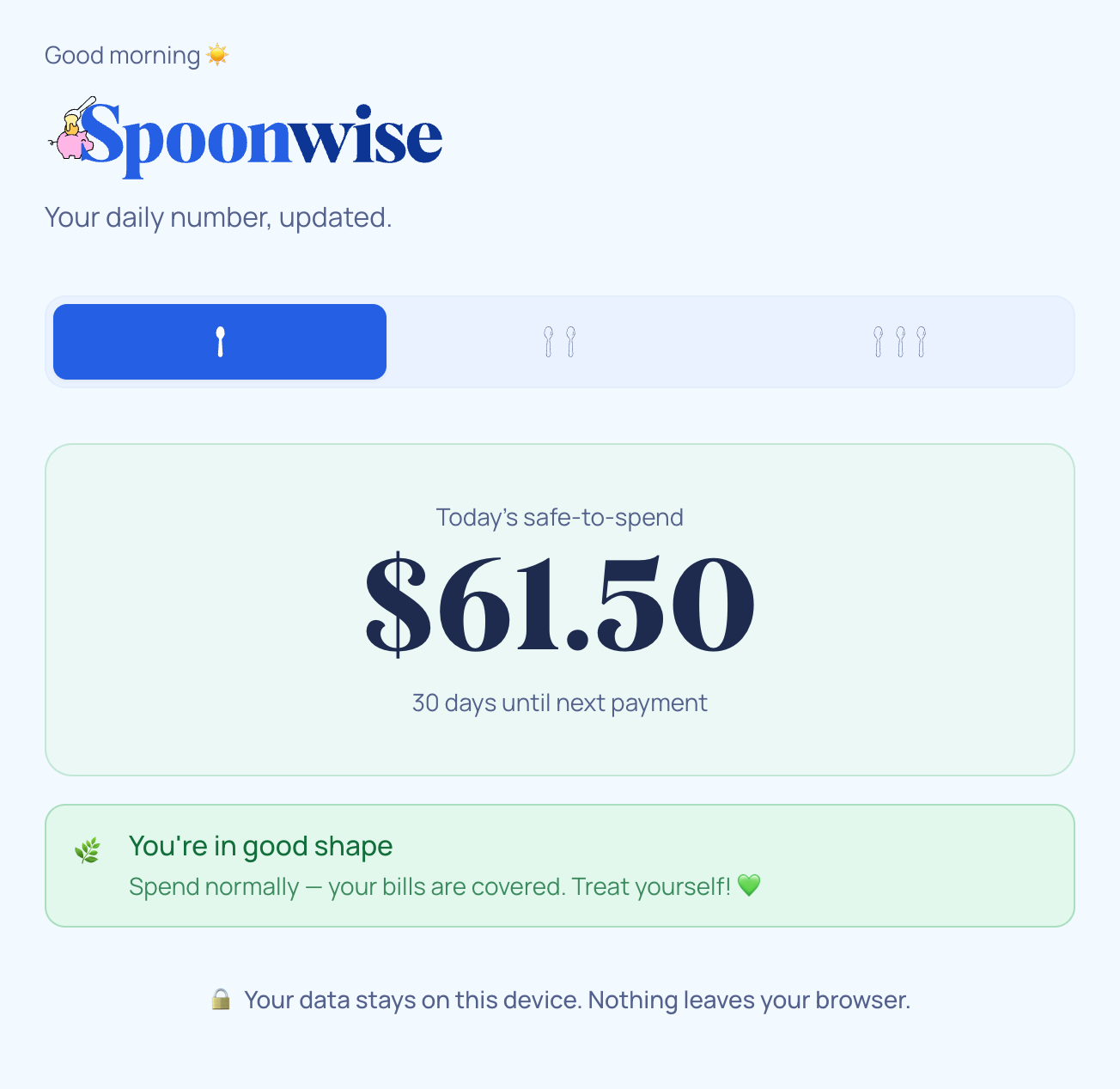
A budgeting app has a strange property: the days you most need it are the days you have the least capacity to operate it. Spoon modes are the answer — a persistent toggle at the top of the app, counted in drawn spoons: one spoon is just the basics, two is a bit more, three is everything.
One spoon shows the number and the light, nothing else. Two spoons adds spending progress and upcoming bills. Three spoons is the full workspace — income, expenses, savings buckets, the impulse-pause tool, progress, settings. The modes aren't an onboarding step you graduate out of; they're a dial you move day to day, and the app remembers where you left it.
Make It Yours
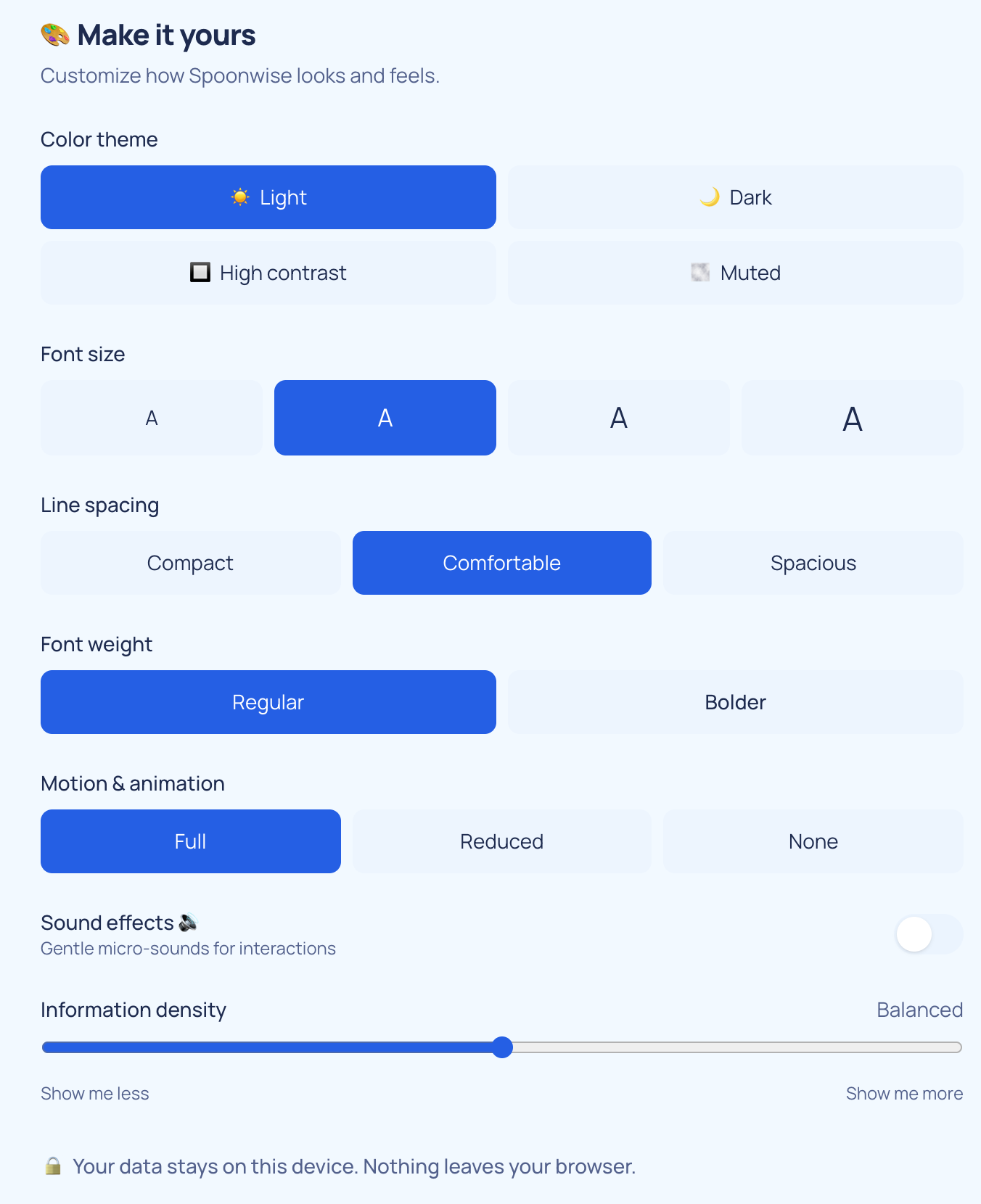
Sensory overwhelm is a real accessibility barrier that "WCAG compliant" doesn't fully cover, so Spoonwise has a sensory settings panel: four color themes (light, dark, high contrast, muted), motion control (full, reduced, none), four font sizes, two weights, three line-spacing options, and an information-density slider. Respecting prefers-reduced-motion is the floor; letting someone turn the interface down to exactly what their nervous system can take today is the feature.
Designing for the lapse
Most engagement patterns punish absence: streaks break, badges gray out, notifications guilt. Spoonwise assumes you will disappear for a while, because everyone does, and treats coming back as the win.
Return after three or more days and you get a welcome-back flow — a 60-second catch-up to freshen your number, no mention of what you missed. The progress view is a garden that grows with every check-in and never wilts; there is no streak to break. The Pause, the impulse-spending tool, follows the same philosophy: log the thing you're tempted to buy, see what it really costs in days of safe-to-spend, and optionally sleep on it for 24 hours. Whether you buy it or skip it, the outcome is recorded without comment. It's a pause button, not a parent.
Privacy as architecture
Spoonwise is for people who find money stressful, which makes budget data unusually sensitive. Rather than write a reassuring privacy policy, I built the reassurance into the architecture: all budget data lives in the browser's localStorage and is never sent anywhere. The server knows exactly one thing about a paying user — the email address that completed checkout.
That's also why login works the way it does. Paying opens a Stripe Checkout ($15, one time; there's a student price, and coaching clients get access included). The webhook records the email and sends a magic link; clicking it sets a session cookie. No passwords — a password is one more thing to remember and one more thing I'd have to protect. The honest trade-off, stated in the app rather than hidden: because nothing syncs, your data lives on the device where you entered it.
The app installs as a PWA and works offline — a budgeting tool that needs a connection to tell you your own number would undercut the whole point.
Building it like a product, not a demo
Spoonwise started inside this site's codebase behind a feature flag, which let me ship it incrementally and launch by flipping an environment variable. At launch it moved to its own home at getspoonwise.app.
The unglamorous parts got real engineering: the service worker versions its cache by commit, so an update can't strand users on stale code; the Stripe webhook verifies signatures, and the test suite exercises it with genuinely signed test events; the calculator, auth tokens, and cookie round-trips are all under test. Several of those tests exist because live data found bugs the happy path never would — the UTC date stamp above, a one-time payment saved without a date that the calculator silently ignored, and a drought-mode calculation that forgot about bills.
Try it
The free calculator needs no account and no payment — enter an income and a bill and you'll have your number in about two minutes.
Outcomes & impact
Spoonwise launched in October 2026 at getspoonwise.app — free calculator open to everyone, $15 one-time unlock, installable as an app on a phone's home screen. It's early days, so the honest outcome so far is the product itself: a complete, tested, live piece of software designed, written, and built by one person.
It also works as a companion to my coaching practice at The Grove: clients get full access included, and the app embodies the same approach the coaching does — practical structure, zero shame.
Learnings
Calm is built, not written
I went in thinking the "shame-free" part of Spoonwise was a copywriting task. It turned out to be in everything: the thresholds that define "doing fine" relative to your own income instead of a universal standard, the garden that can't wilt, the welcome-back flow that exists because I assumed lapses instead of designing against them. Tone you write; calm you architect.
The number has to be right
A warm interface wrapped around a wrong number is worse than a spreadsheet, because people trust it. The bugs I found — evening paydays invisible until morning, a dateless payment silently ignored — were small in code and enormous in what they'd do to someone's trust at a vulnerable moment. Most of the engineering effort went into the correctness of one number, and that was the right place for it.
Constraints you believe in are free features
Keeping budget data on-device started as a value and kept paying dividends: there's no sync service to run, no database of sensitive financial lives to protect, offline support came almost for free, and "your data never leaves your device" is both the privacy policy and the best line of marketing copy I didn't have to write.